Does Telegram Notify Screenshots in Regular Chats?
No, Telegram generally doesn’t notify users when someone takes a screenshot in a regular private chat, group chat, or channel.
In an ordinary one-to-one Telegram conversation, you can take screenshots of the chat without triggering a screenshot notification for the other person. However, the absence of a screenshot notification doesn’t mean the conversation is completely private. The other person can still copy messages, save media where permitted, or photograph the screen with another device.
However, you don’t need to worry about your privacy. Group and channel owners can enable content protection, which restricts screenshots, message copying, forwarding, and media saving.

Does Telegram Notify Screenshots in Secret Chats?
Yes, Telegram attempts to notify users when someone takes a screenshot in a Secret Chat, but the notification is not guaranteed. Secret Chats are designed for more private conversations than regular cloud chats. They use end-to-end encryption and prevent messages from being forwarded through Telegram’s normal forwarding feature. What’s more, on supported Android versions, Telegram may block screenshots altogether.
Can Telegram Secret Chats Block Screenshots
Yes, Telegram has implemented screenshot blocking for Secret Chats on supported Android versions. On other supported configurations, Telegram may allow a screenshot and attempt to notify the other participant. Hence, for the most accurate information, you’d better check the behavior in the current official Telegram app on your device.
What Happens When You Screenshot a Self-Destructing Message
Telegram supports self-destructing messages in Secret Chats and self-destructing media in private cloud chats. These messages or media can be deleted after the configured timer expires. So what can happen when you screenshot a self-destructing message?
Telegram says it will try to send a notification if a screenshot is taken of self-destructing content. However, this doesn’t mean that every screenshot will be detected.
Does Telegram Notify Screenshots of Stories?
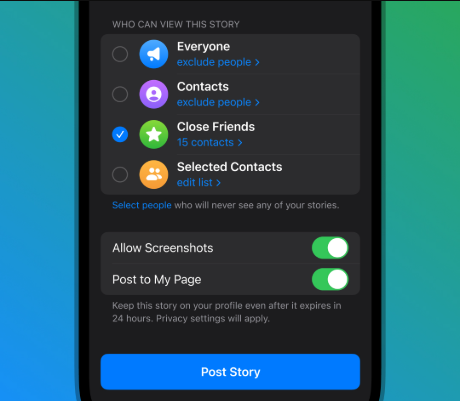
Does Telegram notify when you screenshot a story? Telegram Stories have their own privacy controls, which are different from the screenshot protections used in Secret Chats. Telegram allows Story creators to disable screenshots for their Stories. When the creator turns off the “Allow Screenshots” option, Telegram will remove supported in-app options for saving or sharing the Story and attempt to prevent screenshots through the app.
Can You Screenshot Telegram Without Them Knowing?
Before discussing the question, I prepared a quick overview of Telegram screenshot notifications:
|
Telegram content |
Does Telegram notify screenshots? |
|
Regular private chats |
Generally no |
|
Group chats |
Generally no, unless content protection restricts screenshots |
|
Channels |
Generally no, unless content protection restricts screenshots |
|
Secret Chats |
Screenshot alerts may be sent, or screenshots may be blocked |
|
Self-destructing messages |
Special protections apply; detection is not guaranteed |
|
Telegram Stories |
Creators can disable screenshots, but this is different from a screenshot notification |
In regular Telegram chats, you can take screenshots without the other person receiving a notification. In Secret Chats, Telegram may send screenshot alerts or block screenshots, depending on the device and app version.
However, there is no reliable way to guarantee that a screenshot will go unnoticed in every situation. Here are a few important points to remember. You can have a look:
- Regular chats: Screenshot notifications are generally not sent.
- Secret Chats: Telegram attempts to alert the other participant or prevent screenshots on supported devices.
- Protected groups and channels: Screenshot capture may be restricted by the content protection settings.
- Telegram Stories: Creators can disable screenshots, but this is not the same as a universal screenshot notification system.
- External cameras: Someone can photograph a screen with another device, bypassing screenshot detection entirely.
Take Screenshots of Telegram with AWZ Screen Recorder
How to Protect Your Privacy on Telegram
If you share sensitive messages, photos, or other personal information, you should not rely solely on screenshot notifications. Fortunately, Telegram offers several privacy features to help reduce the risk of unwanted access or sharing. Here, let’s check them one by one.
#Use Secret Chats for Sensitive Conversations
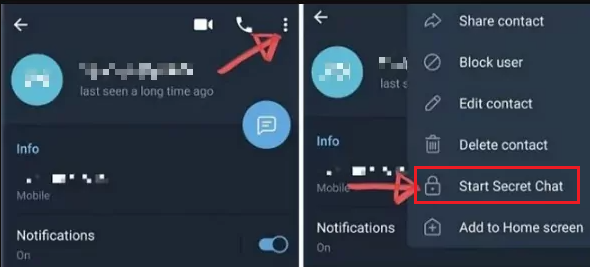
To protect your conversations on Telegram, Secret Chats should be your first choice, as they use end-to-end encryption. In other words, the messages are encrypted between the participating devices. To start a Secret Chat, open the contact’s profile in the official Telegram mobile app and look for the option to start a Secret Chat.
#Set a Self-Destruct Timer
What’s more, Telegram supports self-destruct timers for messages in Secret Chats and for media in private cloud chats. A self-destruct timer can automatically remove supported content after the configured period. Hence, it can reduce how long sensitive information remains visible in a conversation. However, a timer is not a substitute for screenshot protection.
#Review Story Privacy and Screenshot Settings
Meanwhile, if you publish Telegram Stories, review who can view them and whether screenshots are allowed. On Telegram, it provides Story audience options such as Everyone, My Contacts, Close Friends, and Selected Contacts. You can also customize your audience and, where available, disable screenshots for a Story. With those controls, you can customize the limit access and sharing as needed.
#Enable Content Protection in Groups and Channels
If you administer a Telegram group or channel, consider enabling content protection when you want to limit the distribution of members-only content. Telegram's content protection feature can restrict screenshots, copying, forwarding, and saving media through supported app features.
Best Free Screen Recording Tool for Telegram
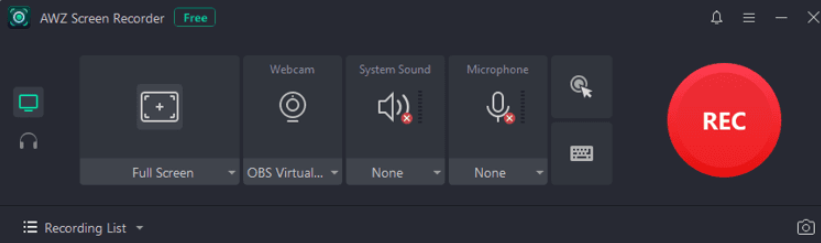
Whether you need to screenshot or screen record on Telegram, AWZ Screen Recorder is worth trying. It is a free screen recorder with no watermark, available on Windows and Mac. What’s more, it supports real-time drawing when recording. You can draw and outline videos or screenshots in real-time.
In addition to capturing Telegram, AWZ Screen Recorder allows you to record webinars, online courses, streaming videos, or presentations. For instance, you can use it to record Messenger video calls, YouTube videos, etc. Click the button to download and install it on your PC, then capture Telegram now!
Conclusion
Does Telegram notify screenshots? Generally, no for regular chats, but Secret Chats have additional screenshot alerts or restrictions, and Stories have separate screenshot controls. In this article, you also learn how to protect your privacy on Telegram. Hopefully, this article is helpful to you.
Olivia